

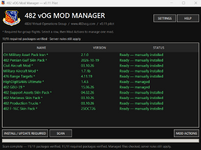
We now have our own in-house, customizable DCS Mod Manager, built specifically for the 482d Virtual Operations Group and our official Group Modlist!
Gone with the ways of OvGME, and moving toward a simpler experience: one click to install or update required group mods as approved releases are published.
Features
- Install / Update Required: Install latest approved group mods after they are NOTAMd from one button.
- Automatic placement: Installs packages into their designated DCS folders.
- Scan & Verify: Checks your files and shows which mod packages are ready.
- Manual mod detection: Recognizes matching mods you already installed.
- Repair: Restores approved files for group managed mods.
- Built-in Help: Simple instructions directly in the app.
- Download and open 482vOG-Mod-Manager.exe; approve the Windows administrator prompt.
- Open Settings and confirm your DCS Saved Games and game folders.
- Click Scan.
- Make sure every mod shows ready. If it doesnt, then you will need to click "MOD ACTIONS" and take appropriate action.
- For a new DCS installation, simply click Install / Update Required and wait for completion.
Existing OvGME or manual installations is also compatible. Contact us on Discord for migration guidance before installing over existing mods you currently have installed.
Beta release
This is v0.11 Beta. Please report any issues so we can continue tailoring it to the group. A more detailed setup and migration guide will follow.
Download here: https://www.482vog.com/index.php?pubs/482-vog-mod-manager.432/
Less DCS setup... More flying.